Salesforce Shield Event Monitoring: Trace It Afterward, Stop It in the Moment
Event Log Files let you trace what happened; Transaction Security Policies let you stop it as it happens
1. The Last Afternoon Before Leaving
On a Friday afternoon, a sales rep who has just handed in their notice opens Salesforce, runs an "All Customer Contacts" report, and clicks Export. Everything looks normal. Nobody notices.
Ending A: nobody finds out. A few weeks later, long-standing customers start getting calls from a competitor. The sales manager asks IT, "Did someone take our customer list?" There is no record, so the only answer is "we can't tell."
Ending B: the export is blocked on the spot. The export stops, a block message appears, and the security team gets an email alert at the same time. The data never leaves the company.
The rep had normal report permissions, and the account was not compromised. The difference is not the employee. It is whether the company was prepared in Salesforce.
Permissions answer "who can see this data." They do not tell you what people with access actually did, or how much. That gap is what Shield's two features fill.
2. Two Features, Two Roles
Salesforce Shield maps one feature to each ending:
| Event Log Files | Transaction Security Policy (TSP) | |
|---|---|---|
| Role | Dashcam | Guard at the door |
| Timing | After the fact (files generated hourly or daily) | The moment the event happens |
| Main use | Investigation, audit, trend analysis | Notify, MFA, block |
| Can it stop an action? | No | Yes |
| Who uses it | Security, audit, Salesforce admins | Security, Salesforce admins |
It is not a choice between the two. TSP stops the obvious risks; Event Log Files reconstruct what happened and reveal long-term patterns. Situations no rule anticipated can still be investigated from the logs, and risks that keep showing up in the logs can become new TSP rules.
User action (login / report / export / API)
        │
        ├─► TSP checks rules ──► Notify / MFA / Block
        │
        └─► Event Log Files (hourly / daily) ──► Dashboards / Investigation / Audit
3. Event Log Files: Trace It Afterward
Salesforce writes user and system activity to log files, one file per event type, such as logins, report exports, API calls, and Apex execution. With a license, dozens of event types are available.
What It Looks Like
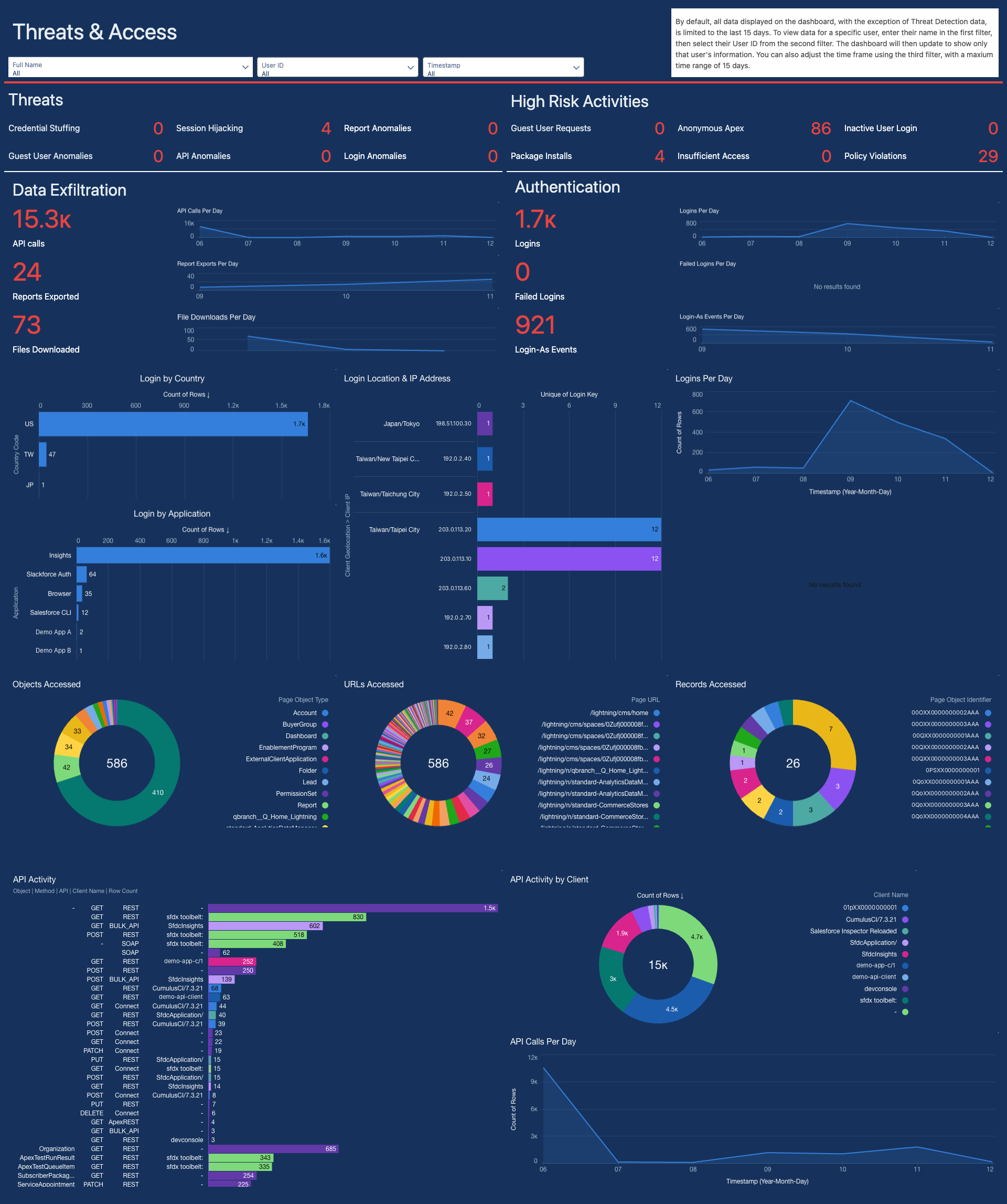
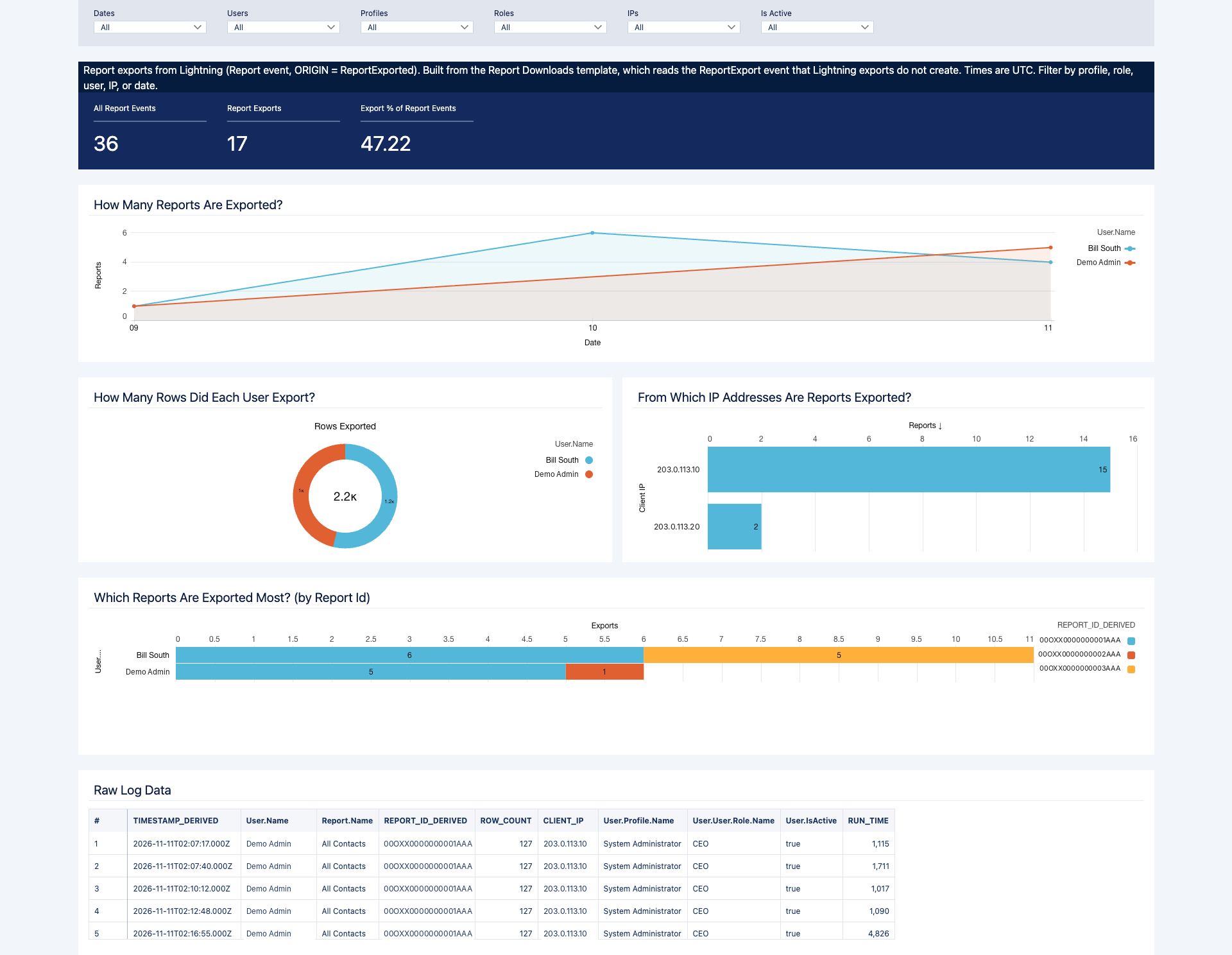
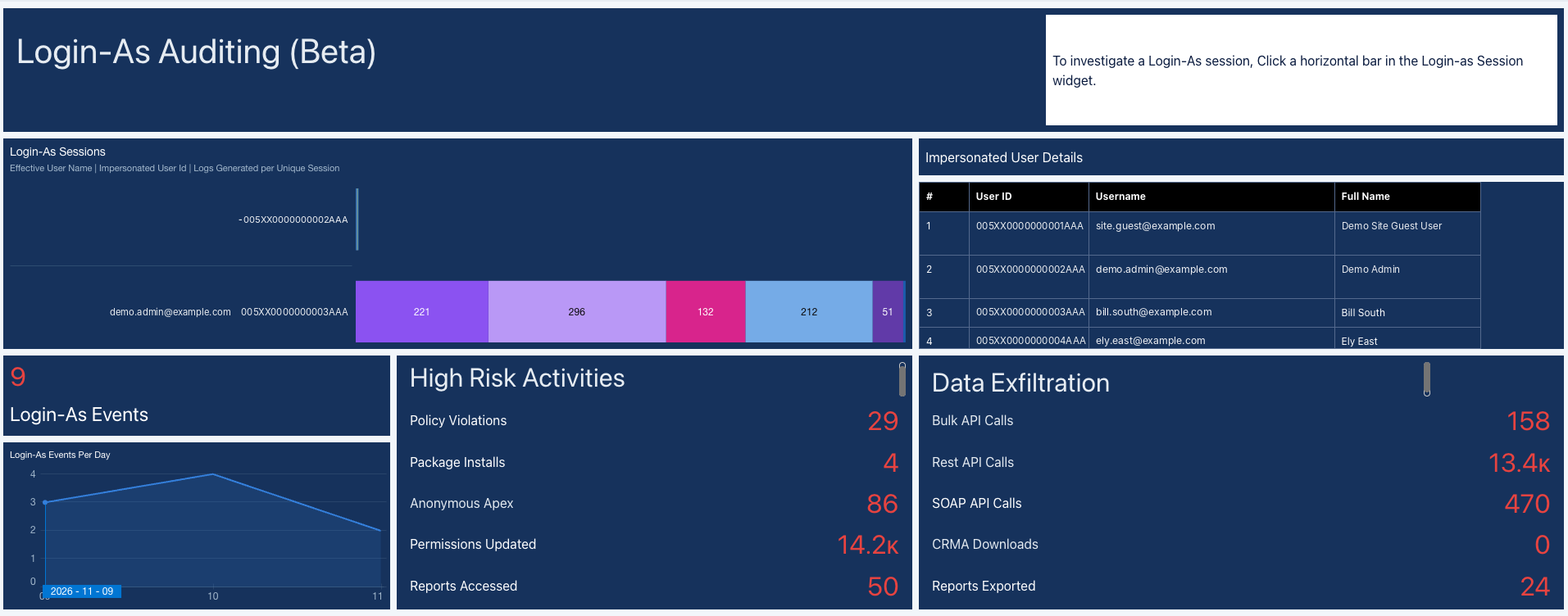
Here is what the logs look like as dashboards (demo org sample data; click to enlarge):
How to Look Things Up
- Event Log File Browser: browse and download directly in Setup.
- API: query the
EventLogFileobject, or load the files into a SIEM or data platform. - CRM Analytics: the Event Monitoring Analytics App provides ready-made dashboards that show who exports the most and when. There is also a dedicated Login-As dashboard showing which admins used "Log in as another user" and which accounts they logged in to.
Back to the Opening Scenario: Investigating a Departure
Suppose Ending A has already happened, and the company wants to know what the rep did before leaving. Investigators usually look at these event types in order:
| Question to answer | Event type to check |
|---|---|
| When and from where did they log in? | Login |
| Which reports did they run and export? | Report. Exports are not always logged as Report Export, so first check which event type your org actually records them in |
| Did they download in bulk via API? | API, Bulk API |
| Did an admin log in as them? | Login As |
Narrow the time range to the few weeks before departure, then look for unusual export volumes or unusual hours. This is also why retention matters: once logs expire, there is nothing left to find.
Four Things to Know Before Rollout
| Item | Details |
|---|---|
| Timeliness | With a license, files are generated hourly but arrive several hours late; use the daily files for complete data. Without a license, you get one file per day. |
| Retention | With a license, logs are kept for one year by default. |
| Long-term storage | Log files are not a formal retention system. If you need long-term audit records, export and store them separately. |
| Someone has to look | It is a record, not an alarm. Assign an owner, for example a weekly review, and always check when an employee leaves. |
4. Transaction Security Policy: Stop It in the Moment
TSP is built on Salesforce Real-Time Event Monitoring. User actions are published as events in near real time, and TSP checks its rules the moment an event occurs, taking the configured action when the conditions match.
Which Events It Can Monitor
Each TSP targets one event type. Common ones include:
| Event | What it monitors | Typical use |
|---|---|---|
| Login | User logins | Require MFA for high-risk logins |
| Report | Running or exporting reports | Block exports with too many rows |
| List View | Viewing or exporting list views | Notify when too many records are viewed at once |
| API | API queries | Bulk queries from accounts other than integrations |
| Bulk API result download | Downloading Bulk API job results | Block or notify on large downloads |
| Permission set assignment | Users being assigned critical permissions | Block or notify when someone gains high privileges |
| Threat Detection | Session hijacking, credential stuffing, report or API anomalies | Notify on detection |
How to Build Rules
| Condition Builder | Apex | |
|---|---|---|
| Code required? | No, point-and-click | Yes |
| Available conditions | A fixed set of fields per event | Any field on the event, plus queries on other data |
| Best for | Rules with a clear threshold, e.g. "rows > 1,000" | Rules with more complex logic |
| Maintenance | Admins can adjust it | Needs a developer, with test classes |
An Apex rule implements the TxnSecurity.EventCondition interface and only decides whether the event triggers the rule. Actions such as notify or block are still carried out by the system according to the policy's settings.
For the opening scenario: choose the Report event, set the conditions "Operation = Export" and "Rows > 1,000", and choose Block as the action. The moment the rep clicks Export, the rule steps in.
Common Rules
- Block report exports above a row limit.
- Require MFA for high-risk logins, for example when the session security level is low.
- Notify when API or integration activity suddenly spikes.
- Notify, or block outright, when someone is assigned a critical permission such as "Modify All Data".
- Notify when Threat Detection detects session hijacking, credential stuffing, or report anomalies.
How Strict Each Rule Should Be
| Action | Effect | When to use |
|---|---|---|
| Notify | Sends an email or in-app notification. The action is not stopped, and the data still goes out. | New rules still being observed |
| MFA | Asks the user to verify their identity again. | High-risk logins |
| Block | Stops the action and shows a block message. | High-risk rules proven reliable |
Not every event supports every action. For example, API calls cannot prompt for MFA, and permission set assignments and Bulk API result downloads can only notify or block. Check before you design a rule.
What an Alert Looks Like
The following is illustrative (sample data); the actual format depends on your notification settings:
Security alert: large report export blocked
Alex Chen tried to export 5,000 rows from the report "All Taiwan Customers"; the export was blocked under company policy.
Format: Excel | Source IP: 203.0.113.10 | Time: 2026-11-12 16:45 (GMT+8)
Who, what, how many rows, and from where are all there at a glance, with no need to piece the story together from logs.
5. How to Roll It Out Without Disrupting Daily Work
Licensing: requires Salesforce Shield or the Salesforce Event Monitoring add-on. Neither TSP nor Threat Detection is included in the free tier.
Go Live in Three Steps
- Observe first: turn on logging and notify-only rules to learn what normal usage looks like, such as how many rows reps usually export at once and which accounts make heavy API calls.
- Then tune: adjust thresholds based on what you observe, and exclude integration and system accounts so every notification means something. If there are too many notifications, nobody reads them in the end.
- Start protecting: add MFA or blocking only to rules that have proven reliable. Keep the rest as notifications.
A head start: Salesforce Labs offers the free Transaction Security Policy Accelerator package, with ready-made rules for data protection, access control, and API monitoring. The package is free, but its rules only work in orgs with a Shield or Event Monitoring license. If your company has its own needs, such as a custom row limit for report exports, we add custom rules on top.
Pre-Launch Checklist
- Every rule has been tested in a sandbox, and Apex rules have test classes.
- Integration and system accounts are excluded from the rules.
- Notification recipients are groups, not single individuals.
- An owner and a review schedule for Event Log Files have been assigned.
- Block messages are clear, so blocked users know whom to contact.
The most common pitfall: a misconfigured block rule on the Login event can lock users out of the org. Test every rule in a sandbox first.
6. Three Questions We Often Hear Before Rollout
Is this monitoring employees? It only records events inside Salesforce, such as logins, reports, and API calls. It does not read email, chat messages, or screens. We recommend telling your staff that this layer of protection is in place.
Who receives the alerts? You decide. We recommend sending them to a security or IT group rather than one person, so nothing is missed when someone is on leave.
Can it replace our existing security tools? No. It adds a layer of protection inside Salesforce. MFA, permission settings, and your SIEM are just as important.
Conclusion: Being Able to Trace Is the Baseline; Being Able to Stop Is Protection
With Event Log Files alone, you can explain afterward what happened. Add TSP, and you have a chance to stop the data before it leaves.
Which features you can use depends on your Salesforce edition and contract. To work out which rules your Salesforce org needs and where to start, talk to us.
Related Reading
Event recap: Salesforce × EKel Agentic AI executive luncheon
EKel Technology and Salesforce co-hosted an Agentic AI executive luncheon in Taipei on 21 October 2026. EKel founder Eric Shen shared how Q Burger rolled out Taiwan's first Consumer Goods Cloud (Enhanced) implementation in three phases, and what AI can do once the data flows.
Introducing Orchard: from business intent to accountable AI delivery
Orchard connects requirements, design, AI execution, review, acceptance, and release. Starting with Salesforce agentic delivery, its broader direction brings the same discipline to monday.com and custom business applications.
After the Vibe-Coding Hangover: Why Most AI-Built Apps Die Before Go-Live
Vibe coding only took off last year, and the halo barely lasted twelve months. Over the past six months the market's mood has shifted from weekend-app wonder to a harder reality: demos everywhere, systems that survive go-live almost nowhere. This piece breaks down the eight walls between demo and production, why code that "looks right" is the most dangerous kind, and how professional teams using the same AI ship systems that run daily operations — including how we replaced Swingvy in four weeks, full video included.
Want to discuss your specific scenario?
A 30-minute conversation with a CTA. Based on your situation, we will answer directly: worth doing, too early, or not our fit.
We use cookies
We use strictly necessary cookies to run this site, plus optional analytics cookies (Google Analytics) to understand how visitors use it. See our Cookie Policy and Privacy Policy.